Held slots
A held slot keeps a series’ weekly time free for its renter, so they can renew it before another renter takes it.
In this section
What it does
While a slot is held, no other renter can book that room on that weekday and time, on any date after the series ends. It books nothing and charges nothing. A studio admin can still book a one-off session there; other staff can’t.
ExampleFridays, 8–9 p.m. in Studio E
Ana’s series is every Friday, 8–9 p.m. in Studio E. Her last booking is Friday, Oct 30.
- Oct 23 · Booked
- Oct 30 · Last booking
- Nov 6 · Held
- Nov 13 · Held
- Nov 20 · Held
- Nov 27 · Held
- Every later Friday · Held
Until the hold ends, no other renter can book Fridays 8–9 p.m. in Studio E: not Nov 6, not Nov 13, not any later Friday. The day after it ends, every one of those Fridays opens at once.
How long it lasts
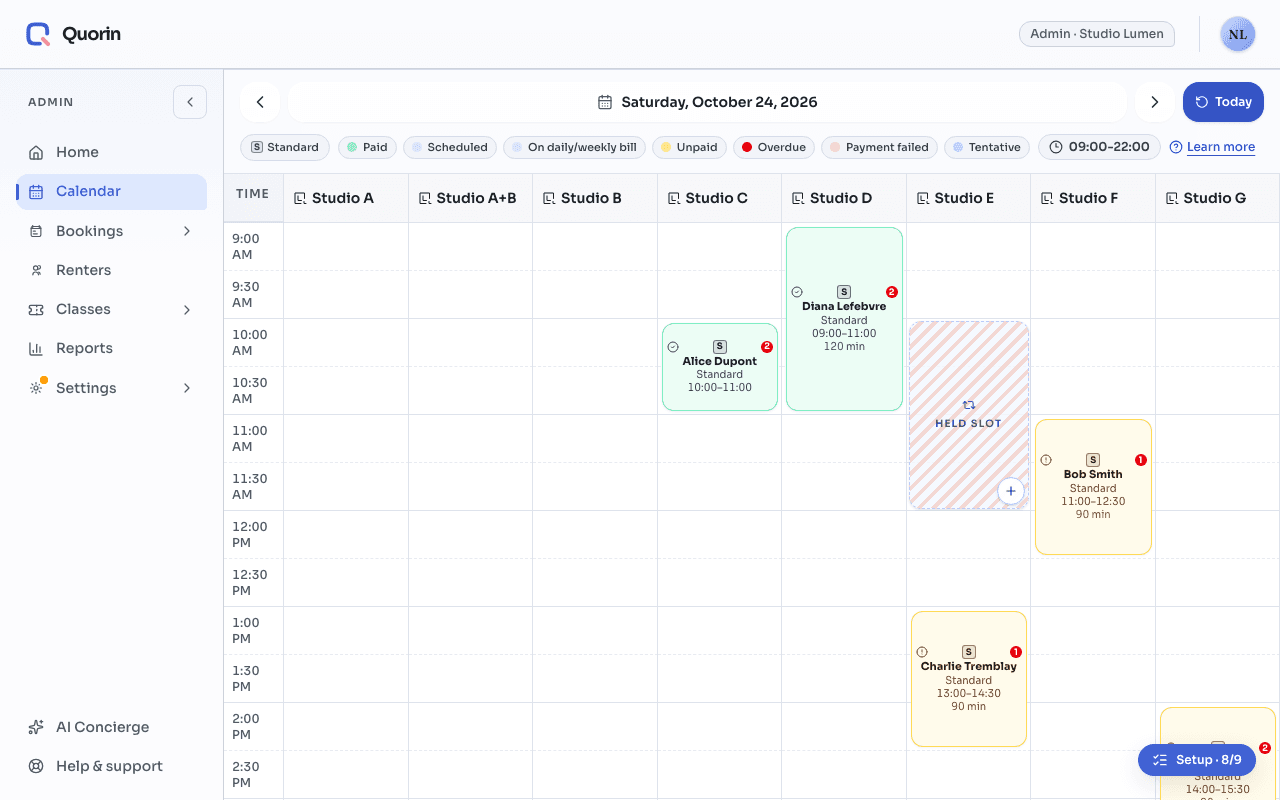
The hold starts with the series. After the series’ last date, it lasts a set number of days, then ends by itself. Your studio chooses that number: Held slot expiry (days), in Settings › Booking rules. On the calendar, held weeks show as striped Held slot blocks.
Three ways it ends
- Renew series. The new series takes the slot over, and its Fridays become real bookings.
- Release the slot. Fridays 8–9 p.m. open to everyone right away. An admin can release it; so can the renter, from their own series sheet. Existing bookings don’t change: releasing cancels and refunds nothing.
- Do nothing. The hold ends by itself after its last day (the series’ last date plus your set number of days), and the time opens to everyone.
Cancelling all of the series’ future sessions at once (admins only) also ends the hold.
Still stuck? Write to support@quorin.studio.